Website Home Page
Service Navigation
foreign trade website construction
Google optimization promotion
Artificial Intelligence Optimization
foreign trade integrated marketing
Foreign trade connection platform
China Manufacturers
Experience Center
Success Stories
Website optimization case
(21)
AI GEO Promotion Cases
(2)
Foreign trade promotion case
(13)
Website design case
(17)
Email marketing case
(2)
News and Information
company news
(22)
Foreign trade news
(11)
Signing News
(30)
Industry information
(135)
About Us
Foreign Trade Forum
Qualification certificate
Customer Reviews
Join us
Contact Us
All Channels
Pages
corporate life
Certificates
Links
success case
Customers
Videos
news
Products
Downloads
Tags
Articles
Customer Reviews
帮助手册
History
Teams
Frequently Asked Questions
Search
Books
Home
帮助手册
Statistics code settings
Update time:Jul 01, 2016 / Creation time:Jul 01, 2016
统计代码设置
:
After getting the statistical code, first enter the background of the website and select the website overview
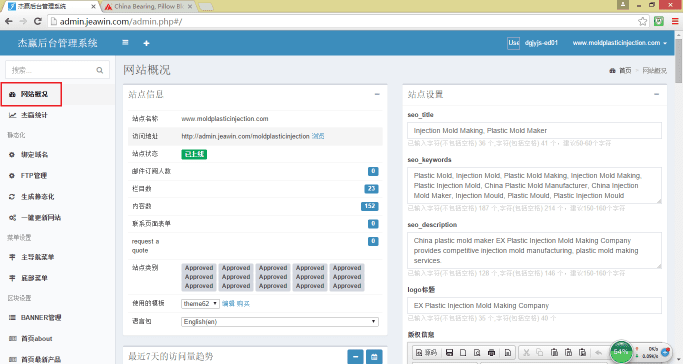
Drop-down
,
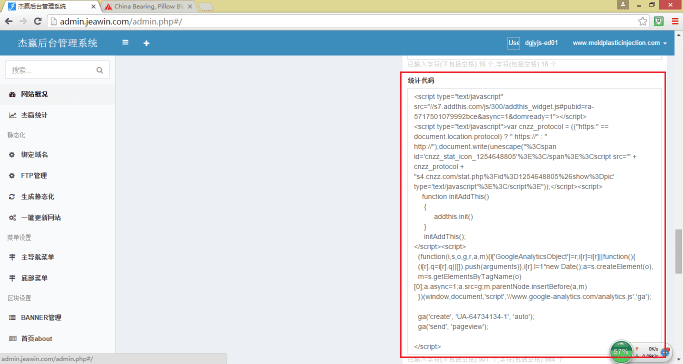
在右侧找到统计代码编辑框
。
将拿到的统计代码复制上去
。
Attention
:
两个代码之间要空一行
。
Books
Back to List
←
Previous
Menu Settings
Next
→
a
Login background
product release
Add Tags
Add tags to products
Technical article release
picture naming
Press Releases
PDF upload
generate static
Website google map editing
Menu Settings
Statistics code settings
a
Image Editing Essentials in the Editor
tool
common problem
watermark pictures
Background Editor User Manual
Friendship link management
multi-language
If you need to contact us, the following is our contact information.
Contact Phone
132 7602 1100
Contact Mailbox
jeawin@jeawin.com
WeChat Contact
Jie Win Network
QQ
215168