Website Home Page
Service Navigation
foreign trade website construction
Google optimization promotion
Artificial Intelligence Optimization
foreign trade integrated marketing
Foreign trade connection platform
China Manufacturers
Experience Center
Success Stories
Website optimization case
(21)
AI GEO Promotion Cases
(9)
Foreign trade promotion case
(13)
Website design case
(17)
Email marketing case
(2)
News and Information
company news
(22)
Foreign trade news
(11)
Signing News
(30)
Industry information
(135)
About Us
Foreign Trade Forum
Qualification certificate
Customer Reviews
Join us
Contact Us
All Channels
Pages
corporate life
Certificates
Links
success case
Customers
Videos
news
Products
Downloads
Tags
Articles
Customer Reviews
帮助手册
History
Teams
Frequently Asked Questions
Search
Books
Home
帮助手册
PDF upload
Update time:Jun 21, 2016 / Creation time:Jun 21, 2016
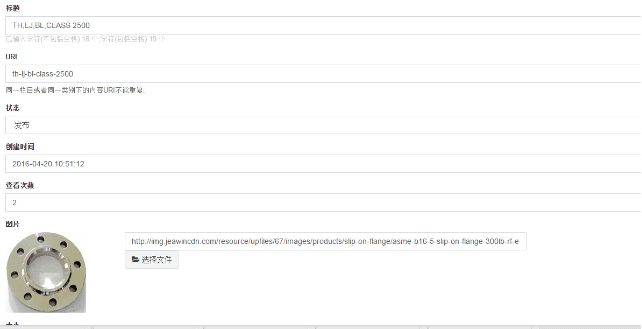
打开添加界面,如图:
进入编辑界面:
The title is
PDF
的文件名;
图片可以选择产品图片;
添加
PDF
文件
Size refers to
PDF
文件的大小,需要自己填写;
(
2
)选择文件就是要把
PDF
The file is uploaded to the background;
添加文件
PDF
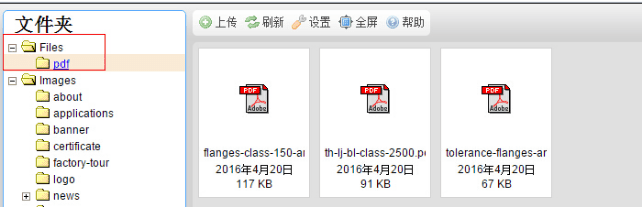
文件夹统一放在此处;
PDF
的命名为自动生成的
URL
Address;
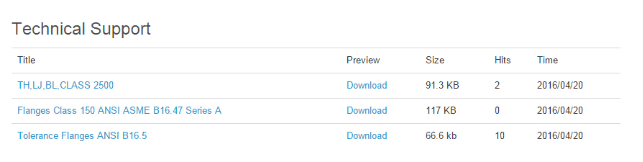
添加成功后点击保存,前台可看到如下效果:
Books
Back to List
←
Previous
Press Releases
Next
→
generate static
Login background
product release
Add Tags
Add tags to products
Technical article release
picture naming
Press Releases
PDF upload
generate static
Website google map editing
Menu Settings
Statistics code settings
a
Image Editing Essentials in the Editor
tool
common problem
watermark pictures
Background Editor User Manual
Friendship link management
multi-language
If you need to contact us, the following is our contact information.
Contact Phone
132 7602 1100
Contact Mailbox
jeawin@jeawin.com
WeChat Contact
13276021100
QQ
215168